
I bought an Altec Lansing ACS48 a while ago but it came without the left satelite speaker. Although I didn’t need it because I only wanted it for it’s powered sub, which still sounds perfect. Because of the way the system was designed, the right satelite speaker has all the controls and it uses a micro-controller to power on – by holding the volume up and down at the same time. Also as stated the volume controls are push button and not done using a pot or variable resistor.
So what I wanted to do is remove the need for the salelite speaker, but still have the option too add mid to high left and right speakers. I first looked around for the pin-outs for the DIN for the salelite speaker, couldn’t find them, but realised after opening it, it was pretty basic setup and I didn’t need them: SW1, SW2, LED+, Ground, Right Speaker +, Left Speaker +.

So I labeled the cables, de-soldered the PCB, cut the cable to about a foot long and re-soldered the PCB. Two RCA’s where added to the speaker leads, although I removed them and opted for a screw down cable holder because most of the speakers I use already used straight cables without ends. Future improvements would be to add a switch that grounds both the switches and label it as “On”, seems pretty obvious, not sure why turning it on has to involve both buttons at once, and why they didn’t just use a rocker switch on the rear of the sub, like everyone else.. ?

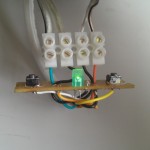
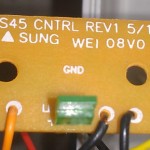

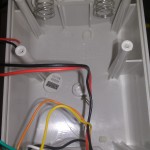
All tested fine and the sub still sounds great, cant believe how old it is vs quality of noise. Well done Altec!
Cheers.
I have an old ACS48 system like yours. I would like to use the subwoofer without the satellites. Is there an easy way to provide power to the subwoofer without connecting the satellites? Thanks
Hi Greg,
Do you mean turn the sub on without the satellite speakers? With the modified PCB above, you press both buttons to turn it on and off. While on, either button adjusts the volume.
Cheers.
guys if any of you have the satellites and don’t need them, I’m looking for replacement tweeters. Mine blew out 🙁 Ordered visaton FRS8/ 4 ohm for the mid range ones
Still rocking one of these systems as my daily computer setup for 3 machines and a Bluetooth player (through a KVM).
About to hack an Arduino into the subwoofer case to remedy what’s a major oversight in my mind: I have to reach way over the desk to turn my (wall-mounted) speakers back on every time I power up, and lay on the Volume Up button to get the speaker volume where I want it. Arduino will do this for me every time I power the system up. (After some judicious coding, soldering and wiring…)
Ugh. Blu-Ray, not Bluetooth. Too much info, not enough wet storage.
I am in the same boat! I have the sub for ACS48 but satellites mysteriously disappeared!. I don’t know if anybody will get this post but gonna try anyway. I also have an old set of ACS48’s that I was trying to wire as a sub only. Unfortunately, i was unable to locate the satellite speakers. I attempted to bypass the satellites, with the on/off switch and volume control, by making a DIN plug using the pin-outs I found in this or another post on similar subject. I used 2 momentary 2 pole switches that I wired like this:
1) one to the SW1+ and Ground (a stranded cable in DIN Cable connected to Male DIN metal outer shell)
2) other to SW2+ and Ground
an LED to LED+ and Ground.
I then tested by momentarily pressing both switches but no turn on and no LED activation.
I thought this would be simple but without the satellite speakers to use, i may be missing something. I did, utilize my Klipsch ProMedia Ultra 5.1 Gaming Sub, but would still like to be able to use the Altec Lansing Sub. Being an engineer I still want to figure this out. Any help is appreciated!
Hi Dave, Instead of using the shielding as the ground, use one of the black cables. I can’t check it ATM but I’m pretty sure there is 2 black wires, one is for the LED (and switches) and the other is for the satellite speakers. This should allow pressing both buttons to turn it on and light the LED.
Cheers
I’m looking for a complete ACS48 3 speaker setup or just the satellites for it.
Jim
My board (inside subwoofer) no longer works and I am planning to replace it with Up2Stream Amp 2.1 with an Expansion Board (volume control). My speakers are ACS 45.1 which seems similar to ACS 48. I have compared cabling (colors, volume board) and this seems identical.
Looks like this is 7 7-core wire with 2 black wires; however, DIN is only 5 pins.
Questions: Are both black wires connected as ground (DIN metal outer shell)?
I am planning to replace the original 28AWG cable to make it longer.
If both black wires are grounded is there a need for both black wires to run to DIN metal outer shell?
Perhaps one of the black wires is looped back close from the left satellite speakers and this is just 6 core cable ?
Hi Rafal,
Sorry for the delays, your assumptions are correct, at least for mine (confirmed with a multi meter), both black cables go back to the metal shielding on the plug. In the current configuration I’ve got a black wire for each channel. it’s not ideal because I half pulled it off another project when I needed speakers again, but it works fine I just have to manually ground (I think) the yellow cable to increase the volume 🙂